
How to Search Galveston County Court Records
The official path runs through the Tyler Odyssey Portal. The County Clerk Records Search page links to it under "Search Court Records," and the portal home shows two public tiles. Smart Search pulls case records. Search Hearings pulls docket dates. Both work from the anonymous dashboard and both use a reCAPTCHA check. The county notes that Tyler's public-access software support ends after December 31, 2025, so the portal's look may shift over time.
Have your search details ready first. A record or case number gives the cleanest match. A person's name should be typed in Last, First Middle Suffix format. For a company, use the business-name search type under the advanced options. Anonymous wildcard searches are limited, so exact terms work best.
Pick the right tile for the question you have. Smart Search answers "what is the case?" and pulls the full case record. Search Hearings answers "when is the hearing?" and needs a date range. The County Clerk Records Search page is useful because it keeps court records separate from real-property, marriage, and assumed-name searches. A reader looking for a divorce decree should not be sent to the real-property index, and a reader looking for a deed should not be pointed at the district court portal. In Galveston County, the District Clerk holds district court files while the County Clerk holds county court at law, probate, and marriage records, so the landing page routes each request to the right system.
- Open the County Clerk Records Search page and choose Search Court Records to open the Odyssey Portal.
- Choose Smart Search for case records.
- Type a record number, or a name in Last, First Middle Suffix format.
- Open Advanced Filtering Options to set search type, case status, case type, or file dates.
- Complete the reCAPTCHA and submit.
- Open a result to read docket entries, then request a certified copy from the clerk if you need one.
The Smart Search form is the county's main case-record tool. The Odyssey Smart Search page takes a record number or a name and returns matching Galveston County court records.
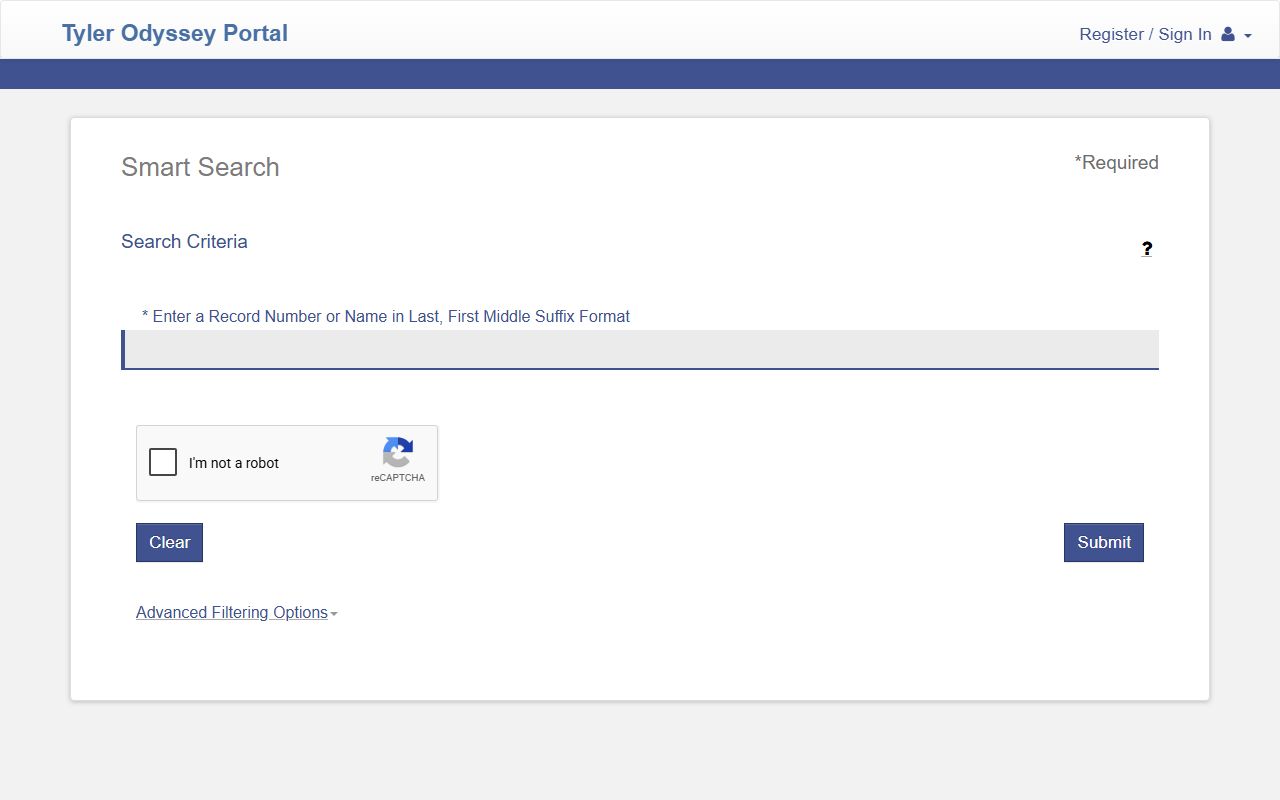
The same box can search by case number, citation number, party, or business name once you open the advanced filters.
Galveston County Court Records Search Fields
Smart Search looks simple but hides a deep set of filters. The main box is labeled for a record number or a name. Open Advanced Filtering Options and you can switch the search type, add a date range, pick a case status, or filter by judge. The page settings show that warrants, judgments, and protection orders are turned off for public Smart Search, so those streams are not searchable here. The fields below are the ones the public form exposes.
| Field Label | Type | Required | Notes / Format |
|---|---|---|---|
| Record Number or Name | Text | Yes | Name in Last, First Middle Suffix format; max 100 characters |
| Filter by Search Type | Dropdown | Defaulted | Smart Search, Case Number, Citation Number, Business Name, Party Name, Attorney Name, Attorney Bar Number, Nickname, Judicial Officer |
| Name Suffix | Dropdown | No | Jr., Sr., II, III, IV, MD, and similar |
| Case Type | Dropdown | No | All Case Types or District Felony in the public list |
| Case Status | Dropdown | No | Active, Disposed, Dismissed, Deferred Adjudication Granted, Warrant Issued, and many more |
| Date of Birth From / To | Date | No | MM/DD/YYYY |
| File Date Start / End | Date | No | MM/DD/YYYY range |
| Judicial Officer | Dropdown | No | Filter by a named Galveston County judge |
| reCAPTCHA | Captcha | Yes | Required for anonymous public searches |
Note: "Sounds Like" name matching is available, but the portal blocks wildcards when Sounds Like is selected.
Types of Galveston County Court Records
Court records in the county break into a few main groups. The court that hears a case decides where its file lives. District courts handle the heavy matters. County courts at law handle the mid-level ones. Justice and municipal courts handle small claims and fine-only cases.
The list below shows which records each level produces.
- Felony criminal records - district court cases with indictments, bond orders, pleas, judgments, and sentences.
- Civil records - pleadings, motions, orders, and judgments in district and county courts.
- Family records - divorce, custody, child support, and protective-order filings.
- Probate records - wills, estates, and guardianships through the Probate Court and County Clerk.
- Misdemeanor and JP records - county court at law, justice court, and eviction or small-claims matters.
Real property, marriage, and assumed-name records are County Clerk records, not district court files, so they use separate search links. Divorce cases are family-law files, usually opened in district court and searched through the same Galveston County court portal. The decree itself is a court record, while the underlying marriage license is a County Clerk record, so the two are pulled from different systems even though people often search them together.
What Galveston County Court Records Show
A case record is a set of fields. Some come from the filing, some from the court's rulings. The Odyssey portal accepts a record number, case number, citation number, or cross-reference number, and a single criminal file can show bond and court-date fields too. The table maps the common fields to what each one tells a reader.
| Field | What It Shows |
|---|---|
| Case Number | The court's unique file ID for the matter. |
| Filing Date | When the case was opened with the clerk. |
| Parties | The people or businesses named in the case. |
| Charge or Cause | The criminal charge or the civil claim. |
| Case Status | The current stage, such as active, disposed, or transferred. |
| Disposition | The outcome of the case or each charge. |
| Judicial Officer | The judge assigned to the case. |
Read each charge row on its own. One case can hold several charges, and each can carry a different status and disposition. A criminal file can also link a charge to a docket number, which lets you cross-search the same matter in jail and court systems. Financial fields such as fines, court costs, and bond amounts may appear as well, though some personal identifiers are redacted before the public sees the file.
Public Access Framework for Galveston County Court Records
Texas law favors open government, but court records follow court rules rather than the general open-records process. Texas Government Code Chapter 552, the Public Information Act, opens many county and Sheriff records. For the judiciary, Section 552.0035 points to rules set by the courts. The Texas State Law Library court records guide explains that not every court record is online and that some must be requested from the clerk who holds it.
Who can request a court record? Generally anyone, though copy fees and ID rules apply at the counter. Sensitive details may be redacted before release. Criminal-history records carry extra limits set by state dissemination rules. The split matters for Galveston County requesters: a public-information request to the Sheriff is not the same as a court-copy request to the District Clerk, and a clerk copy request is not the route for an active law-enforcement investigation file. Send each request to the office that actually holds the record you want.
Note: A court record can be open to search by case number while specific documents, exhibits, or personal fields inside it stay sealed or redacted.
Records That Are Sealed or Confidential in Galveston County
Several record types are closed to the public. Juvenile justice records are restricted under Texas Family Code Chapter 58. Adoption records are confidential under Chapter 162. Records covered by an expunction order must be removed or destroyed, and records under an order of nondisclosure are hidden from the public but stay open to criminal-justice agencies. Sealed civil records, mental-health files, and protected victim details are also off limits.
To view a sealed file, a person usually must show a legal right to it or ask the court to unseal it. Civil court records are sealed only after notice and a hearing under Texas Rule of Civil Procedure 76a. For criminal records, expunction and nondisclosure are separate court processes with their own eligibility rules. The clerk can explain how to file but cannot tell you whether you qualify.
In-Person and Mail Court Record Requests
You can also request records at the counter or by mail. The District Clerk's Galveston office sits in the Justice Center, and a League City office serves the mainland. Bring the case number and a payment method. For mailed copies, the District Clerk asks for a completed request form and a self-addressed stamped envelope; the form notes that postage usually runs one stamp for every five pages.
Galveston County District Clerk
600 59th Street, Room 4001
Galveston, TX 77551
(409) 766-2424
Mon-Fri 8:00 a.m.-5:00 p.m.
The District Clerk records email, DCWEB@co.galveston.tx.us, is for general record questions only. It does not accept filings, notices, or hearing requests.